


Praktika – AI Language Tutor
4.68.10K Reviews
App Specs
- Version
- 4.32.1
- Updated On
- License
- Free
- Downloads
- 10,000,000+
- Developer
- Praktika.ai Company
- Categories
- Education
- Platform
- Android, iOS
Screenshots
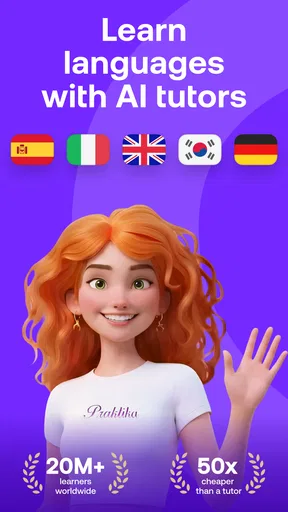
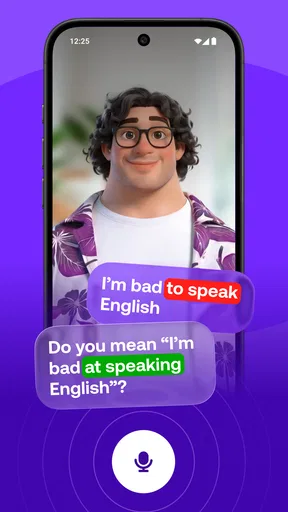
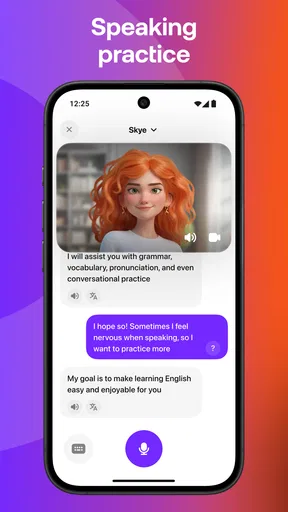
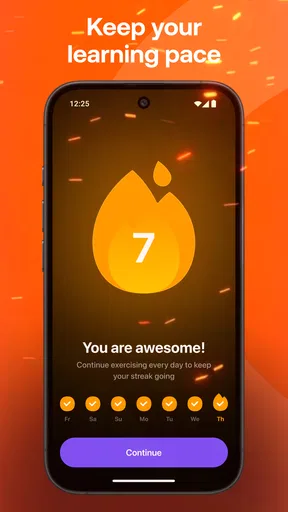
 Analysis by AppCompare
I tend to judge a language app less by its first lesson than by whether I can fit it into a real day: a few minutes before work, a quiet stretch at home, or a longer session when I have the energy to speak aloud. Praktika – AI Language Tutor is built around guided practice and simulated conversation, so its main appeal is having a way to rehearse without arranging a lesson with another person. That makes it worth considering if speaking is the part of language learning you keep putting off.
It is an education app from Praktika.ai Company, and the experience is aimed at people who want to learn by doing rather than only reading explanations. I would treat it as a practice partner, not a complete replacement for every part of study. You still need patience, a regular routine, and realistic expectations about what an app can teach on its own.
What “quick practice” really means
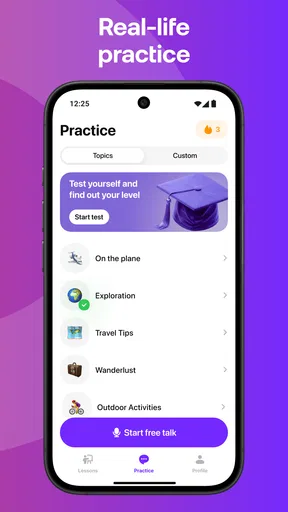
For a short session, the useful question is not whether every interaction is instant, but whether I can make a little progress without a large setup ritual. Praktika’s lesson-and-conversation format gives practice a clear purpose: review a point, try using language, then notice where I hesitate. If I only have a small window, I would choose one narrow goal rather than try to cover several topics at once.
That approach also helps when I am tired. A short speaking attempt can reveal a word or phrase I need to revisit, while an ambitious session may turn into distracted tapping. I would not rely on the app to make every session effortless; speaking requires attention, and the benefit depends on actually responding instead of treating the lesson as background noise.
When a session gets demanding
The most demanding use is likely to be a longer stretch of speaking practice, especially when I am trying to form answers rather than repeat familiar material. That is where an AI conversation can be valuable: there is room to try a sentence, adjust it, and keep going without worrying about slowing down a human partner. It is also where I would plan a break if concentration starts slipping.
A practical routine is to begin with a quick review, spend the main part of the session on one conversation goal, and finish by writing down a few expressions I want to remember. This keeps the app from becoming a sequence of disconnected activities. It also gives me a way to carry useful phrases into a class, a real conversation, or later study with another resource.
Stability, access, and device expectations
Praktika is free to install and has an Everyone content rating, with optional in-app purchases ranging from $1.99 to $199.99 per item. I would start with the free experience and decide whether the way I actually use it justifies paying before committing to any purchase. A large price range is a reason to read each offer carefully, not to assume that every learner needs an upgrade.
Worth Reading Before You Choose

Flipboard Shows What News Apps Must Do Beyond the Feed

Switching to Android Auto Means Rethinking Your Driving Routine

Google Calendar Makes a Crowded Week Easier to Manage

Ludo King Makes the Most of the Minutes Between Plans

Baby Panda World Brings Quick Play to Modern Phones, but Its Game Library Feels Busy

ESPN’s Live Game View Makes Following Close Games Easier
The current version is 4.0.0, and the minimum operating-system requirement is 8.0. Those details matter if you are using an older device: check compatibility before planning a daily routine around the app. The app has more than 10 million installs and a 4.7 average from around 1 million ratings, which suggests that it has reached a broad audience, though popularity alone cannot tell me whether its teaching style fits my needs.
Who benefits most—and who may prefer another route
I would recommend trying it if you want low-pressure speaking practice, prefer interactive lessons to a workbook, or need a way to rehearse between formal classes. It may be especially useful for someone who understands more than they can comfortably say. Practicing a response privately can make the first attempt with a person feel less intimidating.
On an ordinary weekday, for example, I might use a short session during a quiet break to rehearse ordering food or introducing myself. Later, I could revisit the phrases that felt awkward rather than repeating an entire lesson. That is a more useful goal than expecting a few minutes of practice to create fluency; the app can help me prepare, but real-life listening and conversation still matter.
If your priority is detailed grammar reference, long-form reading, or feedback from a qualified human teacher, I would pair Praktika with a textbook, class, or tutor instead of asking it to do everything. A human can respond to context and personal questions in a different way, while a reference book is often easier for checking a rule quickly. The trade-off is convenience: those options may require more planning, whereas an app is easier to open for a brief rehearsal.
Getting Started with Praktika
First things first, downloading and setting up Praktika – AI Language Tutor is a breeze. It's available on both Android and iOS, so you can find it in your app store of choice. Once installed, you’re greeted with a friendly interface that walks you through the initial setup. You can choose from a variety of languages, and let me tell you, the selection is pretty impressive.
The app uses a combination of AI-driven lessons and interactive exercises to help you learn your chosen language. I decided to brush up on my Spanish, and Praktika didn’t disappoint. The lessons are well-structured, starting with the basics and gradually increasing in complexity as you progress.
The Learning Experience
Here's where Praktika really shines. The AI tutor is super responsive and adapts to your learning pace. If you’re struggling with a particular concept, the app provides additional practice until you get it right. You’re never left hanging, which is something I really appreciated.
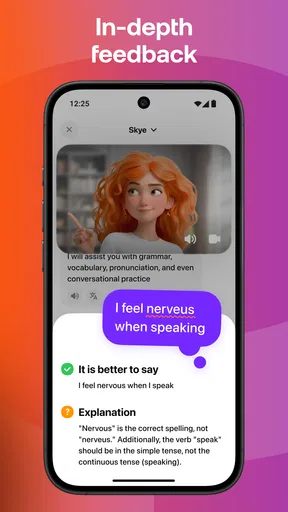
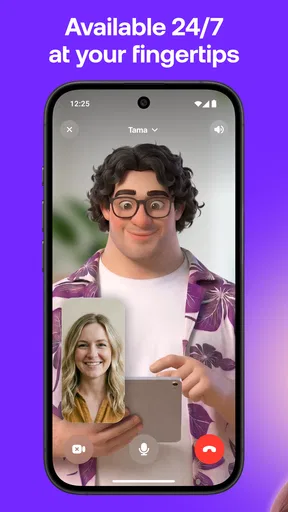
Another cool feature is the conversation simulations. You can practice speaking with the AI, and it feels surprisingly natural. It’s like having a chat with a real person, minus the awkward pauses and misunderstandings. Plus, the app gives you instant feedback on pronunciation, which is a game-changer for language learners.
Interactive and Fun
Learning a new language can sometimes feel like a chore, but Praktika does a great job of keeping things fun. The app includes a variety of games and challenges that make learning feel more like play than work. I found myself actually looking forward to my daily practice sessions.
There’s also a points system that adds a bit of gamification to the process. You earn points for completing lessons and challenges, which can be pretty motivating if you’re competitive like me. It’s a small touch, but it makes a big difference.
My clearest recommendation is to let the speaking exercises guide what you study next. If I stumble over the same kind of sentence twice, I would pause before chasing points and focus on making that sentence easier to produce. This is a small change in workflow, but it turns a pleasant session into more deliberate practice. I would also say answers aloud, even when I know what I want to say; silent recognition can feel like progress while leaving speaking confidence untouched.
Choosing a useful pace
One question many learners have is whether a conversation app is suitable for a complete beginner. I think it can be, provided you are comfortable moving slowly and repeating material. Starting with basic expressions is less intimidating than jumping into free conversation, but a beginner should not mistake a smooth lesson for mastery. I would revisit new phrases on another day and test whether I can recall them without relying on the immediate context.
At the other end, someone with an intermediate level may get the most value by setting a specific speaking challenge before opening the app: explain a routine, ask for clarification, or describe a preference. That gives the exchange a purpose beyond simply keeping it going. If the app feels too easy, a more demanding goal can expose gaps; if it feels too hard, return to shorter answers and build them up.
How it fits beside familiar study tools
Compared with flashcard apps, Praktika’s strongest distinction is the emphasis on producing spoken language in a simulated exchange. Flashcards are usually better for quick vocabulary recall and reviewing a large set of terms, while a conversation gives words a job to do in a sentence. I would not abandon cards if memorization is my weak spot; I would use each tool for the task it handles best.
Compared with a scheduled tutor or language exchange, this app is easier to approach when I have only a few minutes and do not want the social pressure of making mistakes in front of someone. That convenience has limits. A simulated partner is not the same as a person navigating an unpredictable conversation, and a live teacher can explain a personal question in depth. For learners preparing for an exam or a high-stakes conversation, I would use Praktika as rehearsal alongside more targeted instruction.
Practical trade-offs before making it a habit
Speaking practice is not equally convenient in every setting. On a crowded bus or in a shared office, talking aloud may feel awkward even if the session itself is short. I would save conversation work for a private moment and use a quieter review activity when speaking would distract people nearby. That simple distinction makes the app easier to sustain instead of turning every spare minute into an unrealistic lesson slot.
Another useful habit is to stop after a session with one concrete takeaway: a phrase I could not form, a pronunciation point I want to listen for, or a sentence I can now say more confidently. I would keep that note outside the app if I want to compare progress across weeks. The point is not to create extra homework; it is to make sure the next session begins with something more purposeful than opening the app and browsing.
For reliability, I would judge the experience by whether it becomes a dependable part of my routine on my own device, rather than assume that a high rating guarantees identical performance for everyone. If a session is interrupted, the sensible recovery is to return to a small task and rebuild momentum instead of trying to make up for lost time with a long session. A language habit survives better when restarting feels manageable.
My performance verdict
As an education app, Praktika is most compelling when I want to turn passive knowledge into spoken practice. Its simulated conversations, adaptive lesson flow, and pronunciation feedback make it a useful companion for learners who need to get words out of their heads and into sentences. The best results will still come from a mix of deliberate practice, repeated exposure, and real interactions beyond the screen.
I would give it a try if low-pressure speaking is the missing piece in your language routine, and I would keep expectations grounded: it is a practice tool, not a shortcut to fluency or a substitute for every learning resource. With over 10 million installs and a 4.7 average, it is clearly popular, but the right test is whether its format helps you return tomorrow. If you prefer structured reference material or personal instruction, choose those first and use this as an optional speaking companion.
Final Thoughts
All in all, Praktika – AI Language Tutor is a fantastic tool for anyone looking to learn a new language or improve their skills. The combination of AI-driven lessons, interactive exercises, and real-time feedback makes it a standout in the crowded world of language apps.
If you're serious about learning a language and want a tutor that’s available anytime, anywhere, Praktika might just be your perfect match. It certainly won me over, and I’m sure it will do the same for you. Happy learning!
Pros
- Interactive AI-driven language practice.
- Wide range of languages offered.
- User-friendly interface design.
- Adaptive learning paths available.
- Regular updates improve functionality.
Cons
- Requires stable internet connection.
- Limited offline functionality.
- In-app purchases can add up.
- Occasional AI glitches in responses.
- Voice recognition needs improvement.
FAQs for Praktika – AI Language Tutor
What is Praktika – AI Language Tutor used for?
Praktika – AI Language Tutor is designed to help users improve their language skills through interactive conversations with AI tutors. It offers a personalized learning experience, adapting to your level and preferences. Whether you're learning a new language or enhancing your existing skills, Praktika provides a convenient and engaging way to practice.
How does Praktika personalize the learning experience?
Praktika uses advanced AI algorithms to tailor lessons based on your proficiency level and learning goals. The app tracks your progress and adjusts the difficulty of exercises, ensuring that you are consistently challenged. This personalized approach helps you improve more effectively and keeps the learning process engaging.
Is Praktika suitable for beginners?
Yes, Praktika is suitable for learners of all levels, including beginners. The app offers a range of lessons that start with basic vocabulary and grammar, gradually increasing in complexity. Beginners can benefit from the interactive dialogues and immediate feedback, which help build confidence and foundational skills.
Does Praktika require an internet connection?
Praktika generally requires an internet connection to access its full range of features, including real-time conversations with AI tutors and updates to lessons. However, some offline functionalities may be available, allowing you to practice certain activities without connectivity. Check the app's settings for offline options.
Is there a subscription fee for Praktika?
Praktika often features a freemium model, where users can access basic features for free but may need to subscribe for premium content. Subscriptions typically offer additional lessons, advanced exercises, and other exclusive features. Be sure to check the app's pricing details to understand what is included in each tier.


